
NewFile
The New File button macOS forgot.
Free, open-source, native. A small Finder extension that adds ‘New Text File’ — or any file type you want, with optional starter templates — to the right-click menu and toolbar.
macOS 13 or later. Free, open source, no account required.
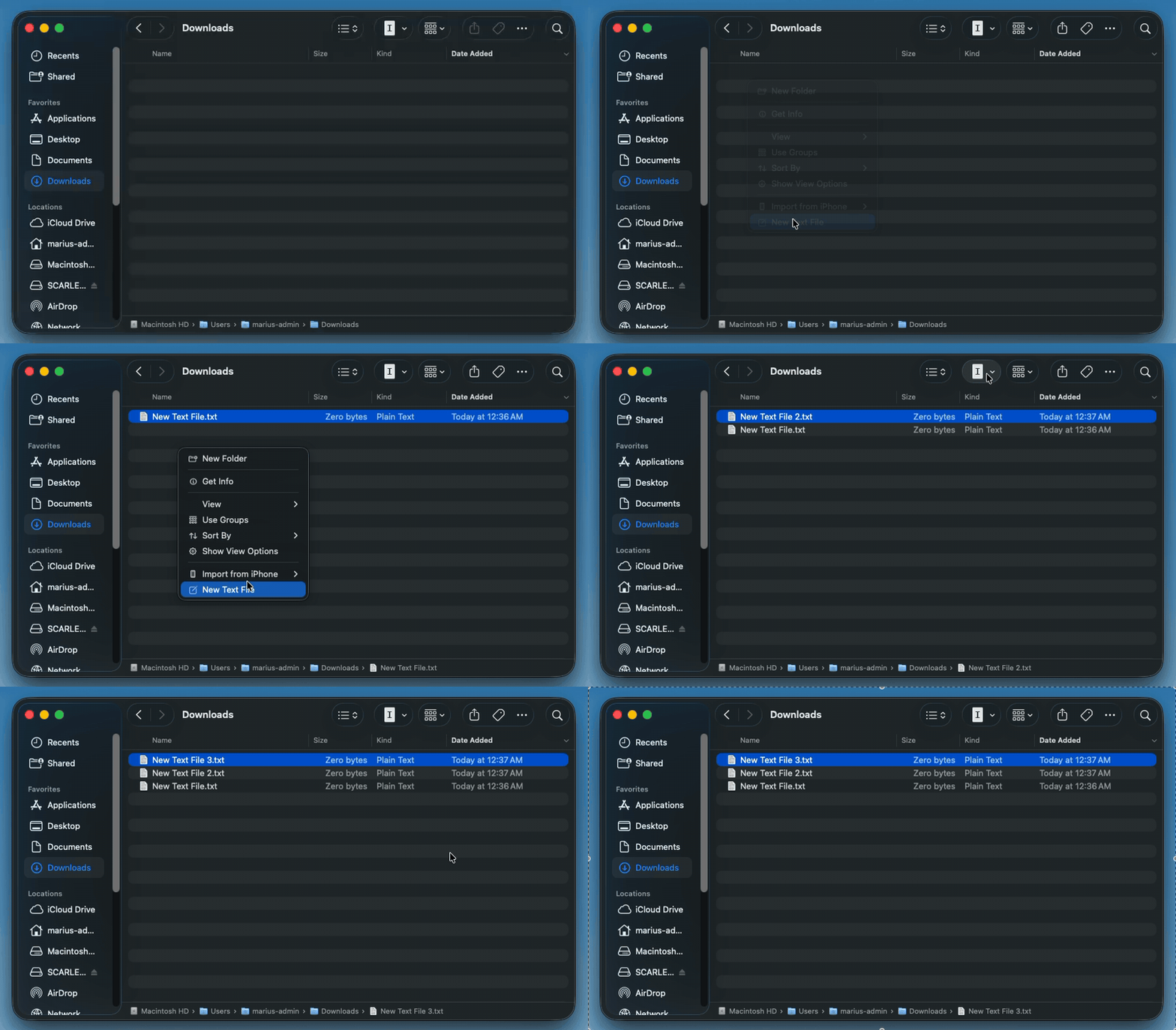
Why does this exist?
Every other OS lets you right-click and create a new file. macOS never has. If you switched from Windows or Linux, you already noticed. If you’ve been on Mac forever, you’ve been working around it — opening TextEdit, saving to the right folder, or running touch in Terminal.
NewFile adds the missing button. One Finder extension, no Terminal, no configuration.
- Right-click in Finder → New Text File. That’s it.
- Toolbar button: drag it once, use it forever.
- Auto-incrementing names, reveals the new file selected.
Custom file types
- Customizable file types — pick from 8 built-in presets (`.md`, `.json`, `.sh`, `.env`, …) or add your own.
- Per-type starter templates — pre-fill new files with frontmatter, shebang lines, or a JSON skeleton.
- Drag-to-reorder and a submenu mode that collapses everything under a single “New File” entry.
v0.2.4 adds a Rich Text (.rtf) file type. Release notes →
FAQ
- How do I create a new text file in macOS Finder?
- Install NewFile, enable its Finder extension once, then right-click in any Finder window and choose ‘New Text File’. The file appears in that folder, named
New Text File.txt, auto-incremented if one already exists. - Why doesn’t macOS have a ‘New File’ option built in?
- Apple has never shipped one — users have requested it since the early OS X era. NewFile is a small Finder Sync Extension that adds the missing option without modifying the system.
- Does NewFile work on macOS Sequoia, Sonoma, and Ventura?
- Yes — NewFile supports macOS 13 (Ventura) and later, including Sonoma (14) and Sequoia (15). On Sequoia 15.0–15.1 the System Settings Extensions UI was buggy; update to 15.2 or later if the NewFile Extension toggle does not appear.
- Is NewFile free? Does it collect any data?
- NewFile is free, open source, and collects nothing — no accounts, analytics, telemetry, or uploads. NewFile accesses the network only to check for updates. The source is on GitHub at github.com/mariusgm/newfile.
- Can I uninstall it cleanly?
- Yes — drag
NewFile.appfrom/Applicationsto the Trash. The Finder extension toggle disappears automatically; nothing is left behind.
Turn on the Finder extension (one time)
- Open System Settings → General → Login Items & Extensions.
- Scroll to Added Extensions.
- Toggle NewFile Extension on. Then in any Finder window choose View → Customize Toolbar… and drag the NewFile icon into the toolbar.